




Townscaper Online
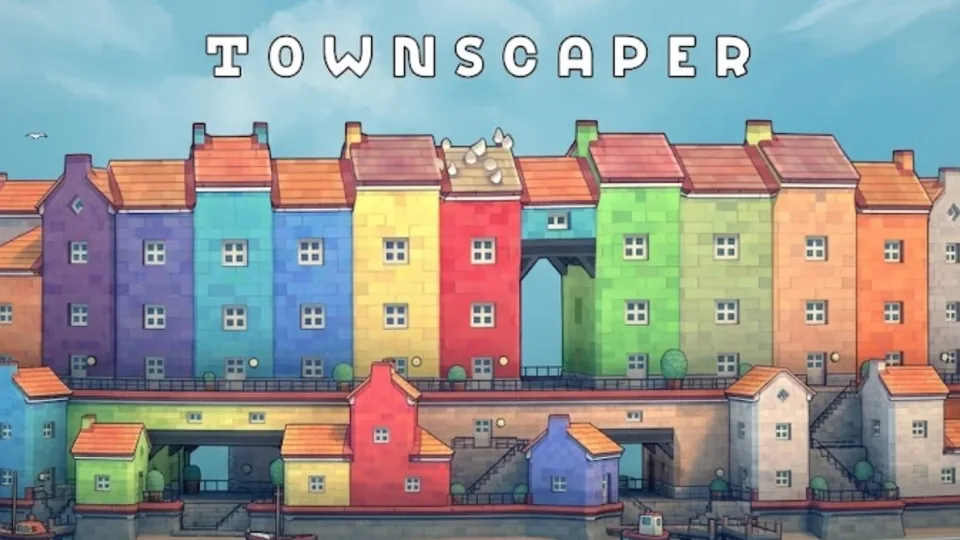
Townscaper is a relaxing instant town-building toy where you place colored blocks on an irregular grid and let the algorithm form houses, arches, stairs, bridges, and courtyards.
Oskar Stalberg's Island-Town Toy
Townscaper is an instant town-building toy created by Oskar Stalberg and published by Raw Fury. After an earlier PC early-access period, the full release arrived for PC storefronts and Nintendo Switch on August 26, 2021, with mobile versions following the same broader release arc. The most important thing to understand is that Townscaper is intentionally not a normal city builder. It has no economy, no citizens to satisfy, no combat, no campaign, no traffic simulation, no story, no levels, no unlock chase, and no win state. Its design is open about that restraint: the point is not victory, management, or optimization, but the pleasure of building and seeing a beautiful shape emerge. That is not a weakness; it is the design.
The loop is beautifully small. Pick a color from the palette, click on the irregular grid, and place a block of house. Townscaper's underlying algorithm reads the arrangement and automatically turns those simple blocks into houses, roofs, arches, stairways, bridges, courtyards, canals, waterfronts, and tiny architectural details. You do not draw every window or hand-place every stair. You shape the mass, and the system interprets it. The pleasure is not just visual; the soft sound of blocks dropping into place is part of why the tool feels calm instead of technical.
That is why Townscaper is better described as a toy than a game. It feels less like managing a city and more like playing with clay that happens to understand seaside architecture. A few blocks become a hamlet. A longer line becomes a street or causeway. A clustered arrangement becomes a dense island neighborhood. A tall stack becomes a tower. Leave holes, and the algorithm may create arches, passageways, or negative spaces that make the town feel intentional.
The building range is broad for such a tiny toolset: quaint island towns with curvy streets, small hamlets, cathedral-like towers, canal networks, or sky cities on stilts can all grow from the same block-by-block action. That range is possible because the grid is not a rigid square grid. Townscaper's irregular geometry makes the same action feel more organic than a standard block editor. Corners curve, rooflines break up, and little details appear where blocks meet.
Oskar Stalberg's background in procedural generation is visible everywhere. Townscaper does not ask players to learn architectural menus because the procedural model carries that burden. Blocks snap together in cohesive ways, and the system decides whether a shape needs a roof, a balcony, a doorway, a support, a bridge underside, or a waterfront edge. The player still makes the important creative choices, but the tool removes the tedious ones.
Blocks, Colors, and Automatic Architecture
The core loop is place, observe, remove, reshape. Click to add, right-click or use the remove action to subtract if the version exposes that control, rotate the camera, then keep building from whatever the algorithm gives back. Instead of following a checklist, you respond to the town's emerging shape. If a cluster creates a pleasing staircase, extend it. If a roofline looks too flat, break it with a tower. If the island feels too dense, carve a canal or courtyard.
Color is more important than it first appears. Townscaper uses a compact palette rather than a large material system, and that limitation is part of the charm. A small set of colors makes each neighborhood readable. Use one color to create a base district, another to mark a tower, and a third to break up long walls. Too many colors can make a town noisy; a restrained palette makes the automatic detail easier to appreciate.
The camera is also part of the game. Townscaper rewards rotating, zooming, and lowering the view to inspect the settlement from different angles. From above, you see the overall island silhouette. From the side, you notice arches, bridges, pillars, balconies, clotheslines, benches, birds, and waterfront edges. A town that looks ordinary from one angle may look like a miniature postcard from another.
Because there are no goals, the player has to invent structure. One session might be about making a canal neighborhood. Another might be about building a single cathedral-like tower. Another might be about connecting islands with bridges or creating a floating city on stilts. The toolset does not change, but the design question changes. That keeps Townscaper peaceful without making it empty.
The best discoveries come from arrangement rather than button hunting. Put blocks in a ring and see whether a courtyard appears. Extend a narrow path and see whether stairs or bridges form. Stack blocks unevenly and watch the roofline adapt. Delete a block inside a dense cluster and see how the algorithm repairs the gap. Townscaper is a game of reading the system's taste.
Because the tools are available immediately, progress is aesthetic rather than mechanical. You do not build a town to unlock a better building. You build a town to discover a better silhouette. One extra block can convert a flat row into a tower. One removed block can open an arch. One color change can turn a random house into a landmark. The game keeps the interface quiet so the player's eye stays on the town.
Relaxing Builder, Not City Management
Townscaper creates a relaxing town-building mood that starts quickly and does not demand management. Many city builders ask for roads, budgets, production chains, power grids, happiness, jobs, and disasters. Townscaper removes all of that. The only pressure is whether the town looks interesting.
That design turns Townscaper into a creative toy built around cozy construction, screenshots, miniature architecture, and low-pressure experimentation. It lets a town become beautiful without optimization, spreadsheets, or failure states.
It is also useful as a visual sketchbook. Players often use it to test town silhouettes, tabletop campaign locations, seaside postcards, fantasy islands, and miniature map ideas. The result is not a technical city plan, but it gives shape language quickly: where the harbor sits, where towers rise, where bridges connect neighborhoods, and how dense a district should feel.
Strategy systems are deliberately absent. There are no resource bottlenecks, objectives, unlocks, enemies, or progression chains. The design is self-directed curiosity: what happens if one block is placed here, another is deleted, this color changes, or those islands connect?
One expectation matters for any compact Townscaper build: the core identity is more important than a feature checklist. Whether you are making a tiny waterfront, a bridge district, or a tall cathedral cluster, the satisfying part is watching simple block placement become automatic architecture. Performance, save/export depth, exact controls, touch behavior, and platform options can vary, but the design heart remains the same: block by block, no goal, just shape discovery.
That also explains why city-management language is the wrong fit. Townscaper is not about tax balance, traffic flow, zoning, citizen demand, or production chains. It is about an irregular grid, a compact color palette, island towns, canals, arches, stairs, bridges, waterfronts, and relaxing building. Those details capture what Townscaper actually is better than calling it a city-management simulator.
Building Habits That Make It Shine
Start small. Place a few blocks in a line, a cluster, and a stack before trying to build a full city. Watch what the algorithm creates in each case. The fastest way to understand Townscaper is to make a shape, rotate the camera, and notice which architectural details appeared automatically.
Build from silhouette before detail. If the island outline is dull, extra windows and colors will not fix it. Make a strong shape first: a curved harbor, a long pier, a stepped tower, a bridge loop, or a courtyard block. After the silhouette works, use color and deletion to guide the eye.
Use deletion as a design tool. Removing a block is not a mistake correction only; it can create alleys, arches, courtyards, canals, and breathing room. Dense towns become more interesting when you carve gaps into them.
Keep colors grouped. A whole island in one color can look calm, but a single contrast building can become a landmark. Use color to guide the eye rather than painting every block differently.
Rotate often. Townscaper builds in three dimensions, and some of its best details hide behind the first camera angle. A bridge may look plain from above but charming from street level. A tower may need one more block only after you see its silhouette from the side.
Finally, do not look for the finish line. Townscaper is complete whenever the view feels right. Take a screenshot, change a district, start over, or build a new island. The absence of a goal is the whole point: the town exists because the act of shaping it is pleasant.